Popular searches: KB Main Page, AI Chat, Widgets
MNDES (Minnesota Digital Exhibit System)
Firm MNDES account:
email: mndes@khmnlaw.com
password: KHLaw2025!
MNDES GENERAL GUIDELINES GIVEN BY THE STATE
(County specific guidelines are noted at the end)
REGISTER
Register to use the MNDES online portal via https://mncourts.gov/mndes.aspx
INSTRUCTIONS FROM STATE
UPLOAD EXHIBITS
Step 1: Enter case number
Step 2: Upload digital exhibits (audio, visual, images and documents) by browsing or dragging and dropping using a computer, mobile phone, tablet, etc.
• Each exhibit must be uploaded individually. For example, one exhibit might be text messages between Petitioner and Respondent. Another exhibit may be text messages between Petitioner and a third party. Multiple exhibits can be submitted at the same time.
• Do not combine exhibits files or combine exhibits into a zipped file and upload as one exhibit.
• Do not compress a file prior to upload, upload file in its native format.
• Do not include an exhibit number.
NAME EXHIBITS
Step 1: Name your exhibits specifically. Update the exhibit name so it specifically describes the content and is easily identifiable:
For example, an image of a red car should be labelled “Petitioner’s image of red car taken January 1, 2020. Text messages between Petitioner and Respondent should be labelled “Petitioner’s screenshots of text messages between Petitioner and Respondent between January 1, 2020, and January 1, 2021.”
SHARE EXHIBITS
MNDES allows parties to share exhibits
Step 1: Select each exhibit you want to share Step 2: Click on the Share icon and enter contact information for other party
Any exhibit that any party intends to offer at the hearing must be uploaded and shared with all parties via the MNDES system no less than 48 hours before the hearing. Failure to timely upload and share exhibits may result in the exhibit being excluded from evidence.
*As an additional safeguard, KH requires that all exhibits are also eserved through Odyssey on OPA. This also provides an easier way to prove service*
SAVE PROOF OF SUBMISSION WITH TRACKING NUMBER AND PROVIDE TO ATTORNEY
Once the trial has started and the parties are discussing potential exhibits, the Court may reference them by their tracking number in MNDES. Therefore, we need to have that information so the attorney knows what is being discussed and can also reference the tracking numbers. This is how to do that:
- After you’ve submitted your exhibits, click on “Submissions” on the left-hand side of the screen. You should see a list of all of your submissions.
- On the top right side of the page there is a box that says “search” with a magnifying glass next to it. Type in the file number for the case and hit search. This will limit the submissions to the current case only.
- Click “PDF Export” towards the top under “My Submissions”
- This should create a document that looks something like this:
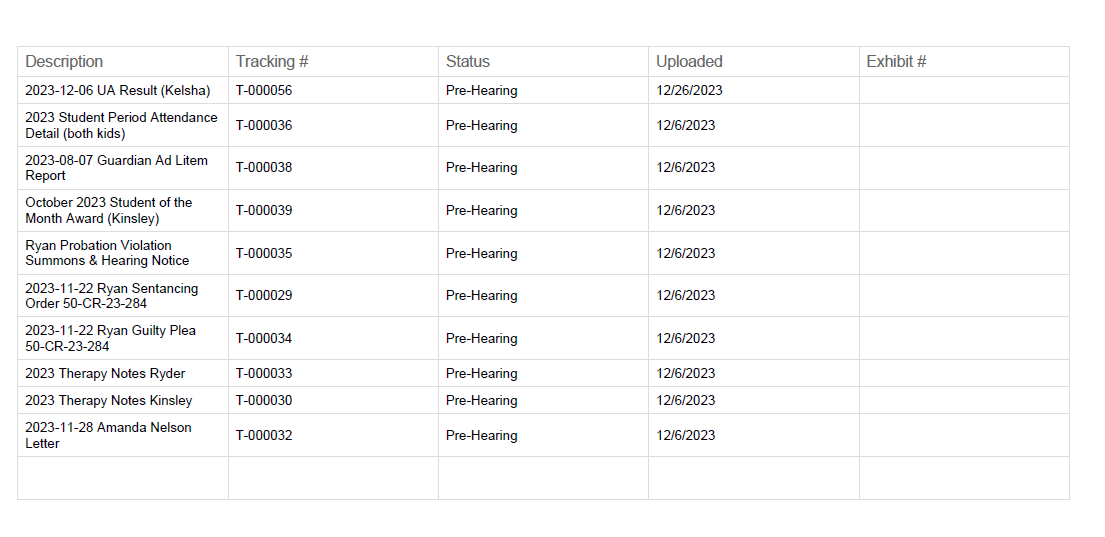
5. Save this document to the Trial Folder in Sharepoint
IMPORTANT NOTICE TO BOTH PARTIES REGARDING EXHIBITS: If a hearing is set in this case, it is not a violation of this order for the Respondent to deliver proposed exhibits to the Petitioner or protected party through the Minnesota Digital Exhibit System (MNDES), email or mail. Respondent shall not include any additional commentary, information, or communication with the exhibits.
PREPARE FOR UPCOMING HEARING
You must offer (asking the judicial officer to allow) your exhibits to be accepted as evidence at the time of the hearing or trial. Exhibits uploaded through MNDES will not be reviewed and considered by the judicial officer until they are offered into evidence.
Resources available for submitting exhibits are located at https://mncourts.gov/mndes.aspx
Mower County
Mower County MNDES Standing Order: MNDES Standing Order 11.2023
Mower County MNDES Guidelines: Mower County MNDES Guidelines