Popular searches: KB Main Page, AI Chat, Widgets
New Divorce or Custody/PT – Initial Steps (New Client Checklist)
**MAKE SURE YOU ARE BILLING FOR EVERYTHING YOU DO**
For simplified, word version of checklist, see:
Step 1: Receive New Client Intake Email & Verify MyCase Info
- Intake will send you an email that looks something like this:
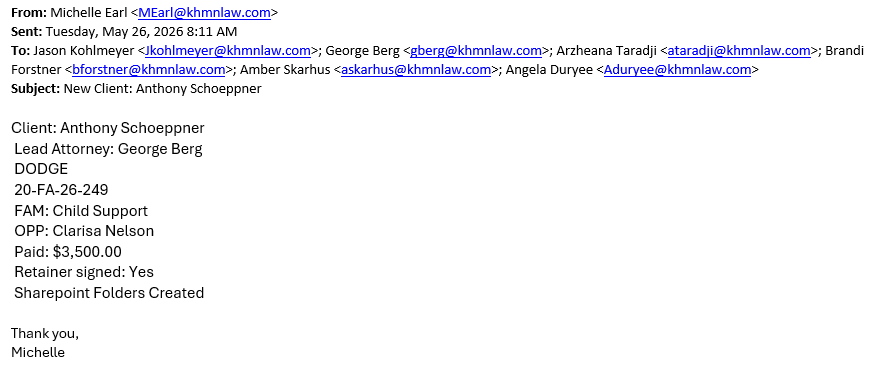
- Double check client signed retainer agreement, if not, follow up with intake specialist.
- Review Mycase Case and verify/update the following info:
- Court Admin (Add as contact)
- Judge (Add as contact – if known)
- OPA (Add as contact – if known)
- Court File Number (Add if applicable)
- Verify staff hourly rates line up with retainer
- Verify there is a lead attorney selected within the contacts
- Verify appropriate staff are added as contacts
- Verify practice area is correct
- Update Case Stage
- Update Status
- Review PC notes to get more info on case/situation
- BILL YOUR TIME
Step 2: Review MCRO (within 24 hours of receiving intake email)
- Go MCRO and see what cases, if any, are associated with the clients (prior crim cases, child support cases, prior divorce or custody cases, etc). If potentially related to the case, download any publicly available docs.
- If you find the case has already been filed, enter the case number in mycase, and make note of any hearings already scheduled, put them on the calendar and save the notices to the file. BILL YOUR TIME
Step 3: Send Intake (within 24 hours of receiving intake email)
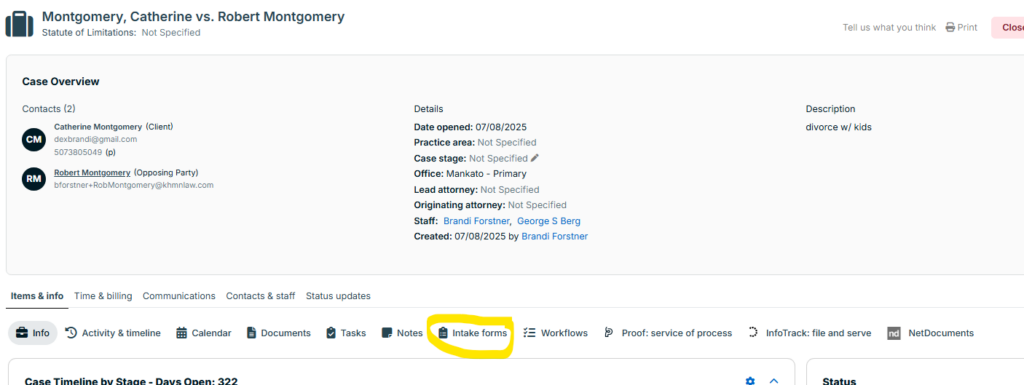
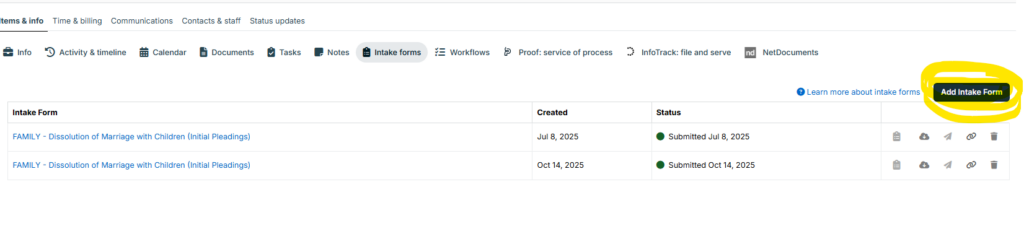
Below – you will see the different options available for the intake form. Review all the options and make sure to select the correct form. If you have questions about which form is correct, see PC notes and talk to attorney who did the consult.
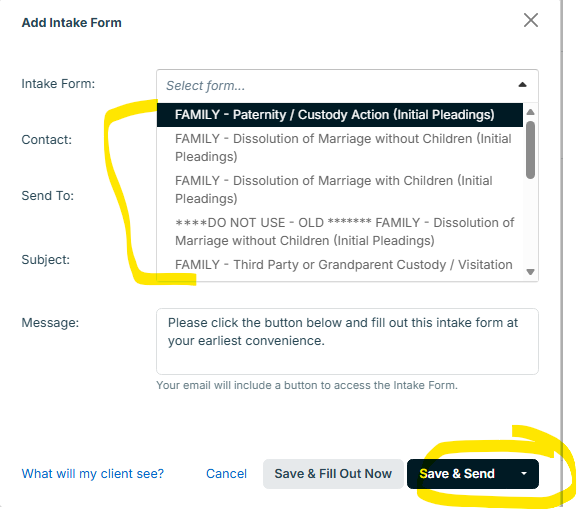
IMPORTANT – Client will receive an email with a link to complete the intake. They CANNOT access the intake via MyCase. For more information on what the intake form email will look like, click here: What will my client see when I email them an Intake Form? | 8am MyCase Help Center
BILL YOUR TIME
Step 4: Share initial KH docs to client via MyCase (immediately after sending intake form)
For Divorces – upload the following docs to mycase:
- Divorce Flow Chart (Found here: Divorce – Flow Chart – K|H Law Wiki )
- Initial Document Checklist for Divorce (Found here: Initial Document Checklist for New Clients – K|H Law Wiki )
For Custody/Paternity – upload the following document to mycase:
- Initial Document Checklist for Custody (Found here: Initial Document Checklist for New Clients – K|H Law Wiki)
Step 5: Send Introduction / Intake message (immediately after sending intake form and sharing documents)
The messages below are just an idea of what the messages should say. Make it your own. Additionally, if we believe the client has documents we need (documents they received from the other attorney or party) incorporate a request for that in this message (it is also requested in the intake, but just to make it clear)
For Divorces (General idea below – feel free to make your own):
My name is Brandi and I am the paralegal that will primarily be assisting Mr. Kohlmeyer with your case. By now, you should have received an email with a link to an intake form. The information in this intake will help familiarize us with your situation and also provide us with the information we need to draft any initial documents. Please complete the intake as soon as you are able and let me know if you have any issue accessing the intake.
I will also be sharing with you on MyCase two documents. The first is titled Divorce Flow Chart and gives a general outline of how divorce cases move forward, including estimated timelines. Obviously each case is different and takes its own path, but this document is helpful in understanding the different stages.
The second document is titled “Initial Document Checklist” which outlines documents the attorney would like you to start gathering and providing to us. A common step in these proceedings is called Discovery. This is the process where each party requests and provides documents and information to the other party, which helps us to be able to advise you of your options as we move forward. Discovery can be a very time consuming and tedious process depending on what documents and information are requested by the other party. While the requested information and documents differ in every case, the documents in the list are very commonly requested and will help us get a start on collecting and organizing this information.
If you have any questions, please let me know. I look forward to working with you!
For Custody/Paternity (General idea below – feel free to make your own):
My name is Brandi and I am the paralegal that will primarily be assisting Mr. Kohlmeyer with your case. By now, you should have received an email with a link to an intake form. The information in this intake will help familiarize us with your situation and also provide us with the information we need to draft any initial documents. Please complete the intake as soon as you are able and let me know if you have any issue accessing the intake.
I also shared a document with you in MyCase titled “Initial Document Checklist.” This checklist outlines documents the attorney would like you to start gathering and providing to us. A common step in these proceedings is called Discovery. This is the process where each party requests and provides documents and information to the other party, which helps us to be able to advise you of your options as we move forward. Discovery can be a very time consuming and tedious process depending on what documents and information are requested by the other party. While the requested information and documents differ in every case, the documents in the list are very commonly requested and will help us get a start on collecting and organizing this information.
If you have any questions, please let me know. I look forward to working with you!
BILL YOUR TIME
Step 6: Set task reminders
Set a task in mycase “Did client complete intake?” Set it up to be due in 2 days from when you sent the intake form. If in 2 days you haven’t received the completed email or response from client, send a follow up text message that says something like:
Hello, this is (NAME) from Kohlmeyer Hagen. Just checking in to see if you got my message in mycase and also the email with the intake form. If not, please let me know so I can resend. Because we need the completed intake form to draft the initial documents, I’d suggest filling it out as soon as possible. If you have questions on the form please let me know. Thanks!
After you send the reminder text message, reset the due date for your task about 3-4 days out and follow up again at that time if the intake is not yet completed. It may be beneficial to call the client at that point to ensure they are getting your communications.
Step 7: (After receiving intake) Draft Pleadings (within 48 hours of receiving completed intake form)
If we are the Petitioner, see: Drafting, Serving, and Filing Initial pleadings as Petitioner – K|H Law Wiki
If we are the Respondent, see: Drafting, Serving, and Filing Initial pleadings as Respondent – K|H Law Wiki