Popular searches: KB Main Page, AI Chat, Widgets
Requesting Copies of Documents from Court (Plain or Certified)
To request a copy of a court document, you will complete and efile the copy request form.
There are two copy request forms in mycase:
- FAM – Copy Request (5th District) – To be used for 5th district cases only
- FAM – Copy Request (NOT 5th District) – To be used for all other cases
FAM – Copy Request (5th District) – How to Complete:
- Indicate the court file number
- “What would you like copies of”
- Document name: Provide the name of the document and the index #
- Plain, Certified, Exemplified: We will only use plain or certified.
- Plain Copy – an emailed copy of the document. That is what we request most of the time.
- Certified Copy – This will be printed by court admin, embossed with the court admin stamp, and mailed (although you could select to pick it up at court admin if it is a rush). Usually, certified copies are only requested in very specific instances. One example is a Summary Real Estate Disposition Judgements where the Recorder’s Office will require a certified copy to record the document.
- IMPORTANT: A multi-page certified document will be stapled. Removing the staple means the document is no longer considered certified.
- Number of copies: Self-explanatory.
- “How to Contact You” – This should already be filled in with Kohlmeyer Hagen Law Office Info
- “Copy Delivery Options”
- Plain Copies: Choose eservice and list your email address afterwards. MAKE SURE YOU ARE SIGNED UP FOR ESERVICE.
- Certified Copies: Always choose U.S. Mail. Most of the time you can select “U.S. Mail to address provided above” which is the office’s address. However, sometimes, if the certified copy is going to be given directly to the client anyway, you can check U.S. Mail to alternate address and put the client’s information so the Court will send it directly to them.
FAM – Copy Request (NOT 5th District) – How to Complete
- Requestor’s Information – Put the firm’s information
- Case Information – Select the appropriate type
- Court File Number – Fill in
- Parties in the Case – Only need to fill in Petitioner and Respondent
- Documents and Types of Copies:
- Document name: Provide the name of the document and the index #
- Plain, Certified, Exemplified: We will only use plain or certified.
- Plain Copy – an emailed copy of the document. That is what we request most of the time.
- Certified Copy – This will be printed by court admin, embossed with the court admin stamp, and mailed. Usually, certified copies are only requested in very specific instances. One example is a Summary Real Estate Disposition Judgements where the Recorder’s Office will require a certified copy to record the document.
- IMPORTANT: A multi-page certified document will be stapled. Removing the staple means the document is no longer considered certified.
- Number of copies: Self-explanatory.
- Cost: You can leave this blank because cost will be calculated via EFS
- Delivery Options
- Plain Copies: Choose email and list your email address afterwards. MAKE SURE YOU ARE SIGNED UP FOR ESERVICE in case they chose to do that instead.
- Certified Copies: Always choose U.S. Mail.
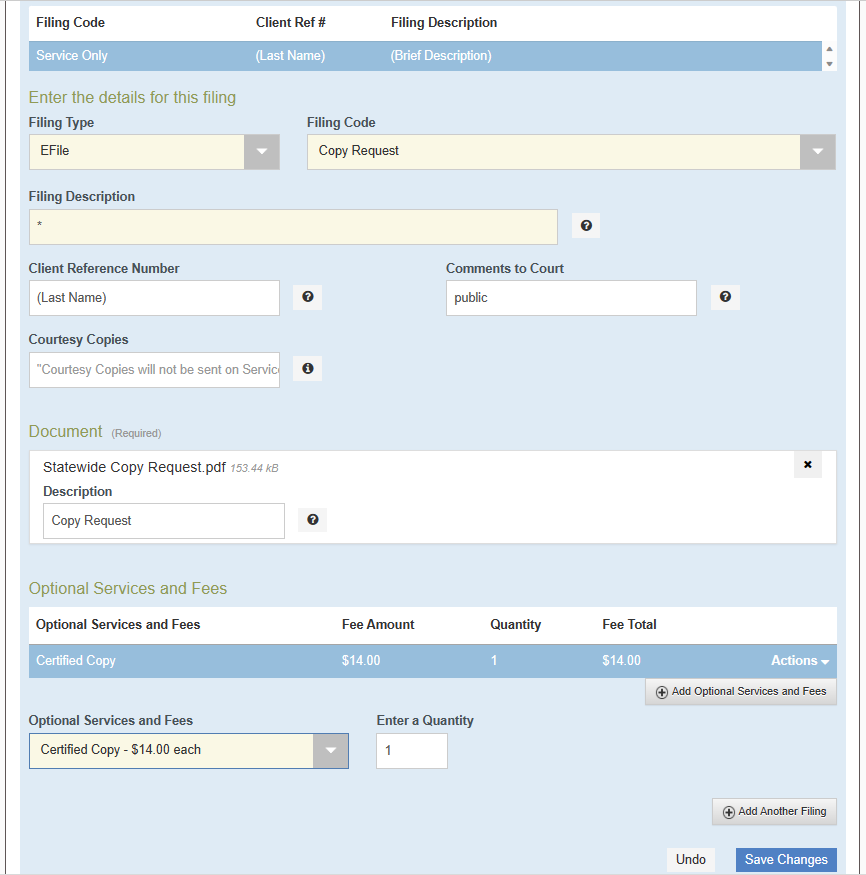
Filing Copy Request
It’s pretty basic and there is an image below that shows what you should select.
You do NOT need to eserve the request on the opposing attorney/party.
NOTE: Plain copies are NO CHARGE so you would NOT add any optional services or fees.
It’s helpful to look at the final charge reflected in EFS for the certified copies and write it down because you’ll have to enter it as an expense later.
After efiling
After efiling the request, you will need to enter the expense IF you requested a certified copy. See article on entering expenses for more info on how to do that.
Then, you’ll just wait for the email with plain copies or the certified copy in the mail.
- If you don’t have your plain copies within 3 days, follow up with Court Admin.
- If you don’t receive the certified copy in the mail within 7-10 days, follow up with Court Admin. Remember: A multi-page certified document will be stapled. Removing the staple means the document is no longer considered certified.