How can we help?
Popular searches: KB Main Page, AI Chat, Widgets
EFS / Odyssey – Cancel a Filing
Sometimes it is necessary to cancel one or more documents within an envelope, maybe because you chose the wrong document or a change needs to be made before filing. You have very limited time to cancel a filing because it must be done while the document is still in “Submitted” status. Once the document is accepted, you cannot cancel it.
To cancel a filing, go to Odyssey and click on the “Pending” box.
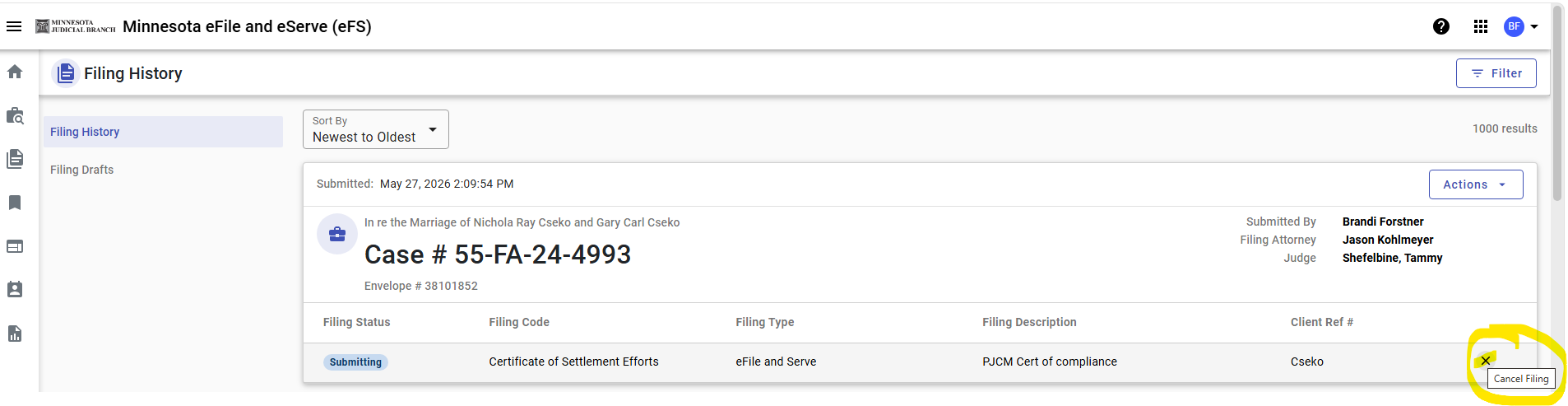
Find the envelope with the filing(s) you need to cancel. Click on the “X” or “Circle with a slash” button to the right to cancel the filing. (see screenshot below) You will need to do this with each document you need to cancel within an envelope.
Notes:
- If you also eserved the document on OPA (or whoever), that cannot and will not be canceled, recalled, or undone. Doing the steps above will only prevent the filing from being sent to the Court. Therefore, you may need to reach out to anyone you eserved to let them know the document was sent in error, or whatever the issue is. If/when you refile the document, you will still need to eserve OPA (or whoever) with the new/corrected document.
- Service Only (filing type Serve) filings cannot be canceled nor recalled.
- A canceled filing cannot be undone. You can use the copy envelope option if you would like to refile.
- All fees for cancelled filings will be returned to your financial account within 3 to 14 business days once the authorization holds drop away.