Popular searches: KB Main Page, AI Chat, Widgets
Legal Descriptions for Real Property
Why we need legal descriptions?
Ideally, the legal description all real property (marital and non-marital) will be listed in the Petition or Counter Petitioner. However, the legal description for all real property (marital and non-marital) MUST be included in final divorce orders (MTAs). There are no exceptions to this. The final MTA must include this information to ensure there is complete clarity as to what properties are being awarded to what parties. These legal descriptions are then used to complete the documents necessary to transfer title of the property (Either SREDJ or QCD). If we do not have the legal description, the property will not be able to be transferred.
Can I just use the legal description from the tax statement?
NO!! If you take nothing away from this entire section, just know that the legal description you see on a tax statement is not the full legal description and should never be used. Here are some examples of a tax legal description vs. the real legal description:
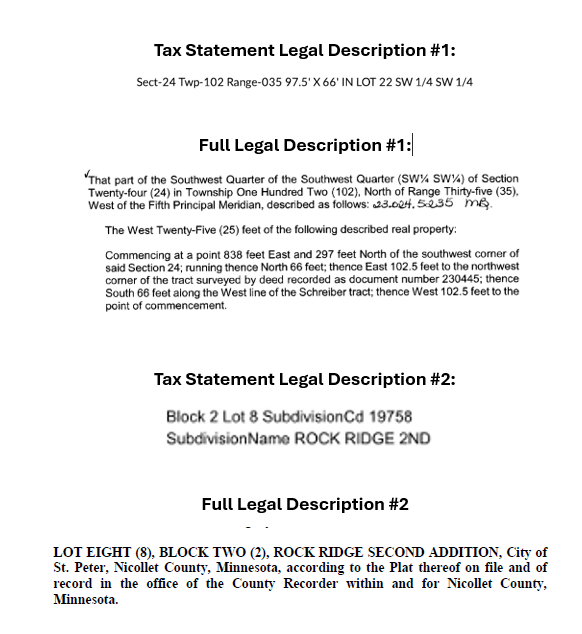
Obviously – there is a big difference between what is listed on the tax statement and the actual legal description. If we do not list the correct legal description on the MTA, then the wrong legal description will be used on the SREDJ or QCD and then those documents will be rejected by the Recorder’s Office. It is crucial to get the full legal description (and make sure you are typing it correctly if you are typing it versus copying it as an image)
Where do I get the full legal description?
- Ask the client if they have a copy of the legal description. If they have it, it would likely be on documents from when they purchased their home like a Warranty Deed or an Abstract of Title. If they previously received the property in a divorce or from a relative, it could be listed on a quit claim deed or a summary real estate dispositional judgement.
If the client doesn’t have a copy, then we need to get it for them. There are a few ways to do this.
- The legal description may be attached as a PDF to the eCRV (electronic certificate of real estate value). This is a newer system and oftentimes the full legal description is not attached, but it’s relatively quick and it’s free so it’s worth a shot.
- First, you’ll need to locate the Parcel ID Number (PIN).
- The best place to find this is on the tax statement (if one has been provided to you). If one hasn’t been provided to you, then you’ll need to find it through Beacon (the most common property system) or similar county recorder database. I always just google “(County name) Beacon” – If the county uses Beacon it will pop up in the first few results. If they don’t use Beacon, usually their equivalent will pop up in the first few results. If you can’t find what program the county uses, try going to the County’s website and looking for information on their Recorder’s Office and find it there.
- Once you make your way to Beacon or whatever website the county uses, type in the property address and locate the PIN / Parcel ID Number from the site itself or by downloading a tax statement. (While you’re here, it’s not a bad idea to save the most recent tax statement to the file so you have it for future reference regarding tax value of the property).
- Go to the eCRV site: eCRV Search (state.mn.us)
- Click on Parcel ID, then below it for search type click “completed”, select the County, then type in the parcel ID#
- If there is an eCRV on file, a page will pull up that says “View Summary for completed eCRV ####).
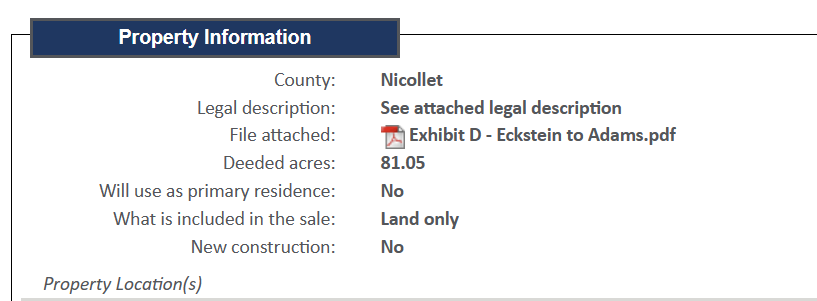
- Scroll down to the Property Information section and see if there is a PDF file attached (see below). If it does, click on it and that should be the legal description, which you should save to the file. Again, don’t be fooled by any text typed into the legal description field under Property Information. That is similar to the legal description on tax statements and cannot be used.
- First, you’ll need to locate the Parcel ID Number (PIN).
- If the Legal Description is not in the eCRV or the eCRV is not on file (typical for older property sales), then the next easiest way to get the legal description is to call the Recorder’s Office in the County where the property is located (with the parcel ID number you now have) and tell them you need a copy of a document that has the full legal description for the property.
- Each county handles these requests a little differently. Some counties will just email it to you for free. Some will email it to you with an invoice that we then need to pay. Other counties will require payment first. If payment is needed, see Senior Paralegal or Office Manager for credit card information.
- NOTE – any cost to get the legal description will be billed to the client as “Land Records / Recording Fees”
- If when you call the Recorder’s Office, they won’t email you the document and instead refer you to a system they use to manage these documents online, such as Tapestry, LandShark, RecordEase, or Laredo, please speak with the Senior Paralegal, Office Manager, or Attorney about accessing documents via these systems.
- Each county handles these requests a little differently. Some counties will just email it to you for free. Some will email it to you with an invoice that we then need to pay. Other counties will require payment first. If payment is needed, see Senior Paralegal or Office Manager for credit card information.